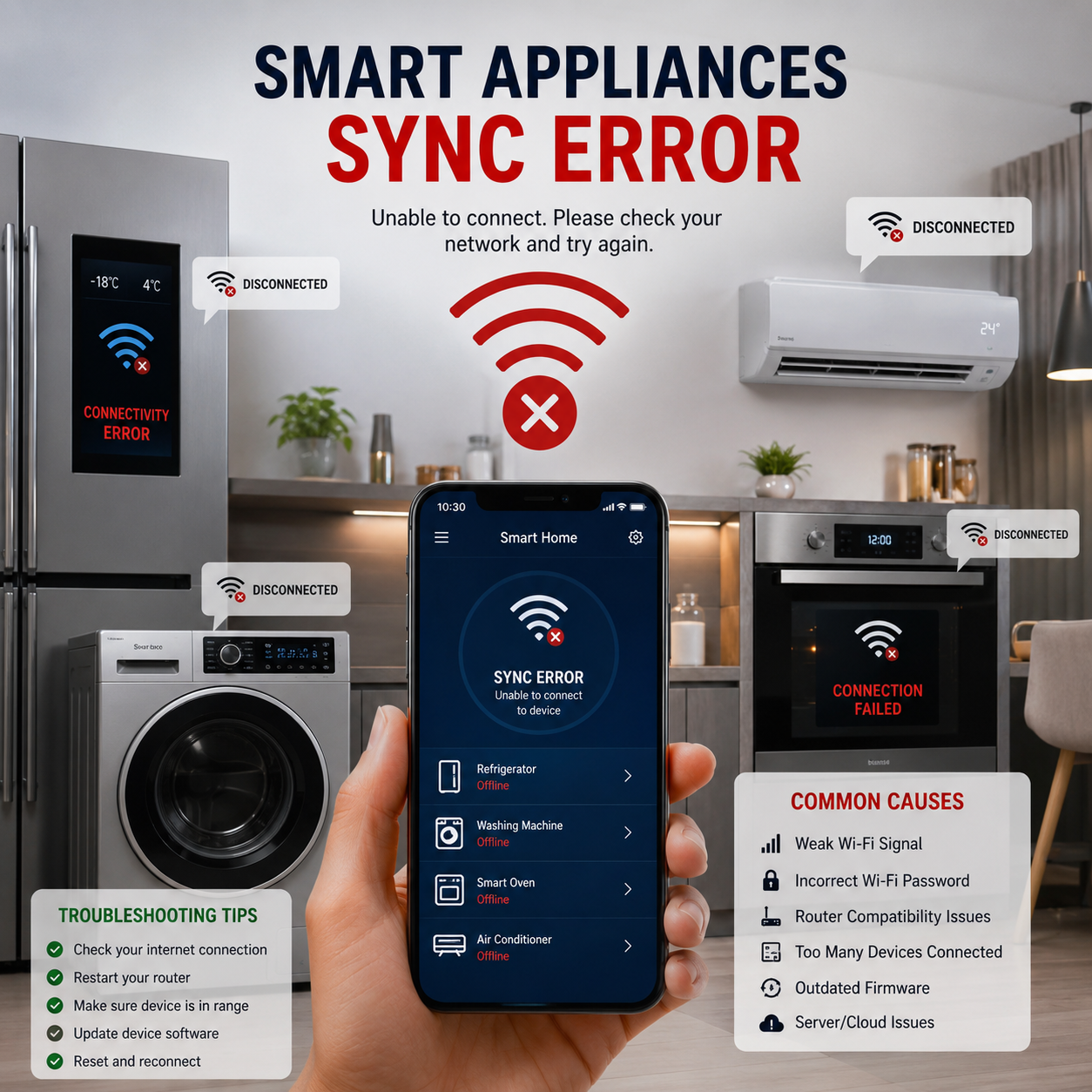
smart appliance sync error :Smart homes are becoming more common in modern households, but along with convenience comes frustration. One of the most reported problems users face today is the smart appliance sync error, where devices fail to connect, disconnect frequently, or stop communicating with apps and cloud services.
From smart washing machines to Wi-Fi enabled ovens and refrigerators, these appliances depend heavily on stable internet, proper router settings, and software compatibility. When something goes wrong, the entire experience breaks down.
This guide explains the most common smart appliance connectivity problems in a simple, user-friendly way. Each section answers a frequently asked question so you can quickly understand the cause and fix the issue without technical confusion.
Why does my smart appliance keep disconnecting from Wi-Fi?
Frequent Wi-Fi disconnections are one of the most common signs of a smart appliance sync error. This usually happens due to weak signal strength, router overload, or interference from other devices.
Smart appliances often stay connected to 2.4GHz networks, which are more stable but slower. If your router is far away or blocked by walls, the signal drops easily.
Another reason is network congestion. If many devices are connected at the same time, the router may struggle to maintain stable connections for all devices.
To fix this:
- Move router closer to the appliance
- Reduce number of connected devices
- Restart router regularly
- Use a Wi-Fi extender if needed
Why can’t my smart appliance find my Wi-Fi network?
If your appliance cannot detect Wi-Fi, it may be due to hidden SSID settings, incompatible frequency bands, or outdated firmware.
Many smart devices only support 2.4GHz networks, not 5GHz. If your router is set to broadcast only 5GHz, the appliance won’t detect it.
Another common issue is router security settings like WPA3, which older smart appliances may not support.
Solutions include:
- Enable 2.4GHz band on router
- Rename Wi-Fi network for easy detection
- Update appliance firmware
- Disable hidden network mode
This type of issue is often misinterpreted as a smart appliance sync error, but it is usually a compatibility mismatch.
Why does my smart washing machine fail to connect during setup?
Smart washing machines often fail during setup due to unstable pairing between the app and device. This is a classic early-stage smart appliance sync error.
During setup, the machine needs:
- Stable Wi-Fi signal
- Bluetooth activation (in many models)
- Correct app permissions
If any step fails, the setup process breaks.
Common fixes:
- Reset appliance network settings
- Keep phone close to appliance
- Disable mobile data during setup
- Reinstall manufacturer app
Why does my smart fridge lose internet connection frequently?
Smart refrigerators stay connected 24/7, so even small interruptions cause disconnections.
Common causes include:
- Weak Wi-Fi signal in kitchen area
- Interference from microwave ovens
- Router overheating or overload
Because fridges are stationary, they are often placed far from routers, making signal stability poor.
To improve connection:
- Use mesh Wi-Fi system
- Avoid placing router behind walls
- Keep firmware updated
Frequent drops often appear as a smart appliance sync error in apps.
Why is my smart appliance app not detecting my device its a smart appliance sync error?
yes its a smart appliance sync error :When the app cannot detect your appliance, the issue is usually communication failure between phone and device.
This may happen due to:
- Bluetooth disabled
- App not updated
- Phone connected to wrong network
Sometimes, background restrictions on smartphones block device discovery.
Fix steps:
- Enable Bluetooth and location services
- Ensure both devices use same Wi-Fi
- Restart app and appliance
- Clear app cache
Why does my smart appliance only connect to 2.4GHz but not 5GHz Wi-Fi?
Most smart appliances are designed to support only 2.4GHz Wi-Fi because it has better range and wall penetration.
5GHz offers speed but lower range, making it unsuitable for many appliances.
If your router combines both bands under one name (band steering), the appliance may fail to connect correctly.
Solutions:
- Separate 2.4GHz and 5GHz networks
- Connect appliance to 2.4GHz only
- Check manufacturer compatibility list
This limitation often leads to a recurring smart appliance sync error in dual-band routers.
Why does my smart device fail to reconnect after a power cut?
After a power outage, smart devices may not reconnect automatically due to router reboot delays or network mismatch.
When power returns:
- Router may take time to stabilize
- Device may try old network session
Fix:
- Restart router and appliance
- Reconnect using app
- Check DHCP settings
This issue is often temporary but feels like a serious smart appliance sync error to users.
Why does my smart appliance show “offline” even when Wi-Fi is working?
This happens when the device is connected to Wi-Fi but not connected to the cloud server.
Reasons include:
- Server downtime
- Firewall blocking communication
- Expired session tokens
Even if Wi-Fi is active, cloud sync failure causes offline status.
Fix:
- Restart router
- Update firmware
- Check manufacturer server status
Why is my smart oven not pairing with my phone?
Smart ovens require precise pairing steps. Failure usually happens due to skipped setup stages.
Common issues:
- Bluetooth pairing not enabled
- App permissions denied
- Outdated app version
Fix:
- Reset oven network settings
- Keep phone within 1–2 meters
- Follow pairing sequence carefully
Why does my smart appliance disconnect when the router is far away?
Distance is one of the biggest causes of connectivity issues.
Wi-Fi signals weaken through:
- Thick walls
- Floors
- Metal appliances
Solution:
- Use Wi-Fi extender or mesh system
- Move router centrally
- Avoid placing router near electrical appliances
This is one of the most physical causes of smart appliance sync error.
Why does my smart appliance stop working after a router change?
When you change routers, the network name and password usually change too.
Smart devices still try to connect to old credentials, causing failure.
Fix:
- Reset device network settings
- Reconnect via app
- Update saved Wi-Fi credentials
Why is my smart appliance not compatible with my new Wi-Fi router?
New routers may use advanced security protocols or settings that older appliances don’t support.
Common issues:
- WPA3 security mode
- Disabled 2.4GHz band
- IPv6-only settings
To fix:
- Switch security to WPA2
- Enable legacy mode if available
- Check compatibility guide
You can also consult safety and installation guidance from organizations like NAPIT Official Site for proper electrical and smart device installation standards.
Why does my smart device fail to update firmware due to connectivity issues?
Firmware updates require stable internet. If connection drops, updates fail midway.
This is often a hidden smart appliance sync error.
Fix:
- Use strong Wi-Fi signal
- Avoid peak usage time
- Keep device plugged in during update
Why does my smart appliance app keep crashing during setup?
App crashes usually come from:
- Low phone storage
- Outdated software
- Buggy app versions
Fix:
- Update app
- Restart phone
- Clear cache
Why does my smart appliance require Bluetooth and Wi-Fi at the same time?
Bluetooth is used for initial pairing, while Wi-Fi is used for cloud control.
Both are required during setup in many devices.
If either fails, setup breaks and leads to a smart appliance sync error.
Why is my smart appliance not connecting after a software update?
Updates can reset network settings or introduce bugs.
Fix:
- Restart appliance
- Reconnect Wi-Fi
- Check update logs
Why does my smart device fail to pair with multiple smartphones?
Most smart appliances allow only one primary device connection for security.
Fix:
- Remove previous pairings
- Reset device
- Reconnect new phone
Why does my smart appliance show connection error even with strong signal?
Strong signal does not always mean stable internet.
Possible causes:
- DNS issues
- Router firewall restrictions
- Cloud server failure
Why is my smart appliance not responding to remote commands?
This happens when cloud sync fails.
Fix:
- Check internet connection
- Restart app
- Re-login to account
Why does my smart appliance disconnect when too many devices are connected to Wi-Fi?
Routers have limits on connected devices.
Fix:
- Upgrade router
- Reduce connected devices
- Use mesh network
Why does my smart appliance fail to connect in dual-band routers?
Dual-band routers sometimes confuse devices using band steering.
Fix:
- Separate SSIDs
- Force 2.4GHz connection
Why is my smart appliance stuck on “connecting” status?
This is a classic smart appliance sync error caused by incomplete handshake between app and device.
Fix:
- Restart both devices
- Reset network settings
- Try setup again
Why does my smart device require resetting again and again for Wi-Fi setup?
Repeated resets indicate:
- Firmware instability
- Weak router signal
- App misconfiguration
Fix:
- Update firmware
- Improve signal strength
Why does my smart appliance lose connection when switching networks?
smart appliance sync error is a common issue its happening because of
Devices do not automatically switch networks unless reconfigured.
Fix:
- Forget old network
- Reconnect manually
Why is my smart appliance not syncing with cloud services?
Cloud sync failures happen due to:
- Server downtime
- Internet restrictions
- Outdated firmware
Fix:
- Check server status
- Update device software
- Restart router
Final Thoughts
Most smart home problems are not hardware failures but connectivity and configuration issues. The smart appliance sync error is often triggered by simple causes like weak Wi-Fi, router settings, or outdated firmware.
By understanding how smart appliances communicate through Wi-Fi, Bluetooth, and cloud services, users can fix most problems without technical help. However, for persistent electrical or installation-related issues, always follow certified guidelines and consult trusted resources like NAPIT Official Site for safe and compliant installation practices.
With the right setup and maintenance, smart appliances can deliver smooth, reliable performance and truly make modern living more convenient.
Leave a Reply